

Introduction
Ren Web is one of the most trusted school management platforms designed to strengthen communication between schools and families. It provides parents, students, teachers, and administrators with a secure online portal where important academic information is available anytime.
Whether you want to check grades, monitor attendance, read school announcements, or communicate with teachers, Ren Web makes every task simple and efficient. Over the years, thousands of private schools, Christian schools, and educational institutions have relied on Ren Web to improve organization and enhance the learning experience.
Today, Ren Web operates under the FACTS Student Information System (FACTS SIS), offering even more powerful tools while maintaining the familiar features that schools and families trust.https://reddingchristian.com/quick-links/ren-web/
Instead of relying on paper reports or waiting for parent-teacher meetings, families can instantly access academic updates from any device. This saves time, improves communication, and helps students stay on track throughout the school year.
What Is Ren Web?
Ren Web is a cloud-based Student Information System (SIS) that helps schools manage academic records, attendance, schedules, grading, communication, and student information in one secure platform.
Its primary goal is to create a seamless connection between schools and families by providing real-time access to important educational information.
Parents can monitor their child’s academic progress, while students can stay updated on homework, grades, classroom schedules, and upcoming school events. Teachers and administrators can efficiently manage classroom data without unnecessary paperwork.
Because everything is stored securely online, information remains accurate, organized, and easy to access whenever needed.
Why Schools Use Ren Web
Modern schools require more than traditional paper records. They need a centralized digital platform that improves efficiency while strengthening communication with families.
Ren Web addresses these needs by offering:
- Secure student records
- Real-time grade reporting
- Attendance tracking
- Homework management
- School calendars
- Teacher messaging
- Parent notifications
- Report card generation
- Online enrollment support
- Administrative reporting
By combining these features into one platform, schools reduce administrative work and create a more transparent educational environment.
Key Features of Ren Web
1. Online Gradebook
Parents and students can view grades immediately after teachers update them. This transparency encourages better academic performance and helps identify learning challenges early.
2. Attendance Tracking
Attendance records are updated regularly, allowing parents to monitor absences, tardiness, and attendance history from anywhere.
3. Assignment Management
Students can review homework, classroom assignments, project deadlines, and upcoming tests in one convenient location.
4. School Calendar
The integrated calendar keeps families informed about:
- Holidays
- Exams
- Sports events
- Parent meetings
- School activities
- Important deadlines
5. Secure Messaging
Parents and teachers can communicate directly through the portal, ensuring faster responses and better collaboration for student success.
Ren Web Login Guide: Step-by-Step Instructions
Accessing Ren Web is simple once your school has created your account. Most schools now use the FACTS Family Portal, which includes the familiar Ren Web features while providing an updated and more secure experience.
Whether you are a parent, student, or teacher, following the correct login process ensures quick access to grades, attendance records, assignments, tuition information, and school announcements.
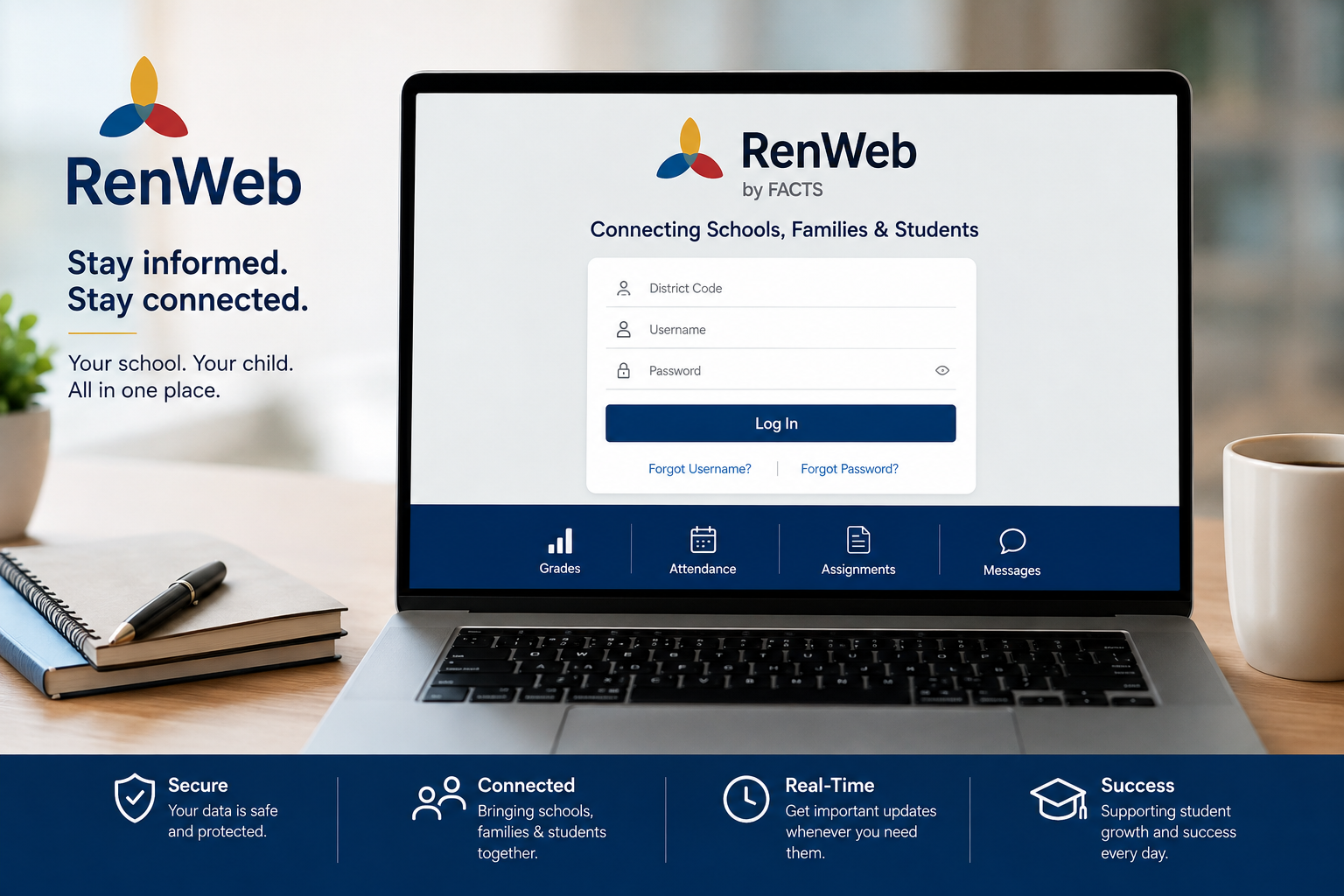
How to Log In to Ren Web
Use these simple steps to access your account:
Step 1: Visit Your School’s Family Portal
Open your web browser and go to your school’s official FACTS Family Portal or Ren Web login page. Most schools provide the portal link on their website.
Step 2: Enter the District Code
Each school has a unique district code. This code identifies your school within the FACTS system.
If you do not know the district code, you can usually find it:
- On your school’s website
- In your welcome email
- By contacting the school office
Step 3: Enter Your Username
Type the username provided by your school. In many cases, this is your email address, but some schools assign a custom username.
Step 4: Enter Your Password
Carefully enter your password, paying attention to uppercase and lowercase letters.
Step 5: Click Login
After entering your credentials, select Login to access your dashboard.
Within seconds, you’ll see your personalized Family Portal with all available information.
Creating Your Ren Web Account
New users generally receive an invitation from their school.
The registration process usually includes:
- Opening the invitation email.
- Clicking the registration link.
- Verifying your identity.
- Creating a secure password.
- Accepting the account terms.
- Signing in for the first time.
Once activated, your account can be used throughout the academic year.
Resetting Your Password
Forgetting a password is common, and Ren Web makes recovery straightforward.
To reset your password:
- Open the login page.
- Select Forgot Username/Password.
- Enter your registered email address.
- Follow the password reset instructions sent to your inbox.
- Create a new, strong password.
- Sign in using your updated credentials.
For security reasons, choose a password that combines uppercase letters, lowercase letters, numbers, and special characters.
Ren Web Dashboard Overview
After logging in, users are greeted with a dashboard that provides quick access to essential school information.
Common dashboard sections include:
Academic Grades
Parents and students can monitor:
- Current grades
- Assignment scores
- Test results
- Semester averages
- Report cards
This real-time visibility helps families stay informed about academic progress.
Attendance Records
Attendance tracking allows users to view:
- Daily attendance
- Absences
- Late arrivals
- Early dismissals
- Attendance summaries
Parents receive timely information whenever attendance is updated.
Homework and Assignments
Students can quickly review:
- Homework
- Projects
- Class assignments
- Due dates
- Teacher instructions
Having assignments available online helps students stay organized and avoid missed deadlines.
School Calendar
The built-in calendar keeps families informed about important events, including:
- School holidays
- Examination schedules
- Parent-teacher conferences
- Sports competitions
- Graduation ceremonies
- Special activities
Checking the calendar regularly helps everyone stay prepared.
Announcements
Schools use Ren Web to share important updates such as:
- Emergency notifications
- Campus news
- Policy changes
- Event reminders
- Holiday schedules
- Academic announcements
Instead of relying on printed notices, information is delivered instantly through the portal.
Benefits of Ren Web for Parents
Parents are among the biggest beneficiaries of the platform because it provides continuous insight into their child’s education.
Stay Informed Every Day
Instead of waiting for report cards, parents can monitor progress throughout the school year.
Improve Communication
Direct messaging allows parents to communicate with teachers quickly and professionally.
Monitor Attendance
Parents can identify attendance issues before they become serious concerns.
Support Better Academic Performance
By reviewing grades and assignments regularly, parents can provide timely encouragement and assistance.
Save Time
Everything—from schedules to announcements—is available in one secure location, reducing paperwork and unnecessary phone calls.
Benefits of Ren Web for Students
Students also gain valuable tools that encourage responsibility and better organization.
Some of the biggest advantages include:
- Easy access to assignments
- Up-to-date grades
- Class schedules
- Homework reminders
- Academic planning
- Increased accountability
- Better communication with teachers
These features help students build productive study habits and manage their workload more effectively.
Advanced Features of Ren Web
Beyond grades and attendance, Ren Web provides a complete school management solution that helps parents, students, teachers, and administrators stay connected. Its wide range of tools reduces paperwork, improves communication, and creates a more organized learning environment.
Below are some of the platform’s most valuable features.
Gradebook Management
The online gradebook is one of Ren Web’s most popular tools. Teachers can update grades as assignments are completed, allowing parents and students to monitor academic progress in real time.
The gradebook typically includes:
- Assignment scores
- Quiz and test results
- Homework grades
- Semester averages
- Final report card grades
- Teacher comments (when enabled)
This transparency helps families identify academic strengths and address challenges before they become larger issues.
Attendance Management
Accurate attendance tracking is essential for every school. Ren Web simplifies this process by allowing teachers to record attendance electronically.
Parents can view:
- Daily attendance
- Absences
- Tardy records
- Early dismissals
- Attendance history
Many schools also send automatic notifications when a student is marked absent, helping parents stay informed throughout the school day.
Assignment and Homework Tracking
Students no longer need to rely only on handwritten planners. Ren Web keeps all classroom assignments in one convenient location.
Students can easily access:
- Homework
- Project deadlines
- Class activities
- Reading assignments
- Upcoming tests
- Teacher instructions
This feature promotes better organization and encourages students to complete work on time.
School Calendar
The integrated calendar keeps everyone informed about important dates throughout the school year.
Typical calendar events include:
- School holidays
- Examination schedules
- Parent-teacher conferences
- Sports competitions
- Graduation ceremonies
- Club meetings
- Field trips
- Special events
Having a centralized calendar helps families plan ahead and avoid scheduling conflicts.
Secure Messaging
Effective communication is one of Ren Web’s greatest strengths.
Instead of relying on paper notes or phone calls, parents and teachers can communicate through a secure online portal.
Secure messaging can be used to discuss:
- Academic concerns
- Attendance questions
- Classroom updates
- Assignment clarification
- Upcoming events
- Student achievements
This creates a faster and more reliable communication channel between home and school.
Student Scheduling
Students can review their daily and weekly class schedules directly within the portal.
Schedules often include:
- Class periods
- Teacher names
- Classroom numbers
- Elective courses
- Timetable updates
Having easy access to schedules helps students stay prepared for each school day.
FACTS Family Portal Integration
Today, Ren Web operates as part of the FACTS Student Information System (FACTS SIS). While many schools still refer to it as “Ren Web,” users often access the same features through the FACTS Family Portal.
This integration provides several improvements, including:
- A modern user interface
- Enhanced security
- Faster performance
- Improved mobile access
- Better integration with tuition management
- Expanded reporting tools
For users, the transition is seamless, as the familiar Ren Web functions remain available within the updated FACTS platform.
Ren Web Mobile App
Busy families often need access to school information while away from a computer. The Ren Web mobile app allows parents and students to stay connected wherever they are.
Using the mobile app, users can:
- Check grades
- View attendance
- Read announcements
- Access homework
- Review calendars
- Receive notifications
- Send messages
- Monitor academic progress
The app provides a convenient way to stay informed without logging in through a web browser.
Security and Privacy Features
Schools manage sensitive student information, making data security a top priority.
Ren Web includes multiple security measures to protect user information.
These features often include:
- Secure login authentication
- Encrypted data transmission
- Password protection
- User-specific access permissions
- Regular system updates
- Secure cloud infrastructure
Parents can feel confident that academic records and personal information are protected through industry-standard security practices.
Benefits for Schools and Teachers
Ren Web is not only valuable for parents and students—it also streamlines daily operations for schools.
For Teachers
Teachers can:
- Record grades quickly
- Track attendance electronically
- Share assignments
- Communicate with parents
- Generate progress reports
- Manage classroom information efficiently
For School Administrators
Administrators benefit from:
- Centralized student records
- Simplified reporting
- Enrollment management
- Improved communication
- Reduced paperwork
- Better data organization
- Time-saving administrative tools
By automating routine tasks, schools can spend more time focusing on teaching and student success.
Tips for Getting the Most Out of Ren Web
To maximize the benefits of Ren Web:
- Log in regularly to review updates.
- Enable notifications if your school offers them.
- Check grades weekly instead of waiting for report cards.
- Review the school calendar every month.
- Keep your contact information up to date.
- Use secure passwords and change them periodically.
- Encourage students to monitor their own academic progress.
- Contact teachers promptly if questions or concerns arise.
These simple habits help families stay engaged and support better educational outcomes.
Common Ren Web Login Issues and How to Fix Them
Although Ren Web is designed to provide a smooth user experience, users may occasionally encounter login or account-related problems. Most issues can be resolved quickly by following a few simple troubleshooting steps.
Incorrect Username or Password
One of the most common login problems is entering an incorrect username or password.
How to Fix It
- Double-check that your username is spelled correctly.
- Make sure your password is case-sensitive.
- Turn off Caps Lock if it is enabled.
- Try typing your password manually instead of copying and pasting it.
- If you still cannot log in, use the Forgot Username/Password option.
Forgotten Password
If you’ve forgotten your password, don’t worry. The recovery process only takes a few minutes.
Steps to Reset Your Password
- Open your school’s Ren Web or FACTS Family Portal login page.
- Click Forgot Username/Password.
- Enter your registered email address.
- Check your inbox for the password reset email.
- Follow the instructions to create a new password.
- Log in with your updated credentials.
Choose a strong password that includes uppercase letters, lowercase letters, numbers, and symbols to improve account security.
Incorrect District Code
Every school has a unique district code. If you enter the wrong code, you won’t be able to access your account.
Solution
- Visit your school’s official website.
- Look for the Family Portal or Parent Resources page.
- Check your welcome email from the school.
- Contact the school office if you still cannot find the district code.
Browser Compatibility Issues
Sometimes the problem isn’t your account—it’s your web browser.
Try These Solutions
- Clear your browser’s cache and cookies.
- Refresh the page.
- Update your browser to the latest version.
- Try another browser, such as Chrome, Edge, Firefox, or Safari.
- Disable browser extensions that may interfere with the login process.
Slow or Unavailable Website
Occasionally, the Ren Web portal may load slowly because of scheduled maintenance or temporary server issues.
What You Can Do
- Wait a few minutes and try again.
- Refresh the page.
- Check your internet connection.
- Try accessing the portal later.
If the issue continues for an extended period, contact your school’s technology department.
Best Practices for Using Ren Web
To get the most value from Ren Web, make it part of your daily or weekly routine.
Here are a few practical tips:
- Log in at least once a week.
- Review grades after assignments are posted.
- Monitor attendance regularly.
- Read school announcements promptly.
- Keep your email address and phone number updated.
- Enable notifications if your school supports them.
- Encourage students to check their own progress.
- Contact teachers early if academic concerns arise.
Staying engaged helps families support student success throughout the school year.
Why Families Trust Ren Web
Thousands of schools continue to rely on Ren Web because it simplifies communication and improves transparency between educators and families.
Some of the biggest advantages include:
- Easy access to academic information
- Secure online platform
- Real-time updates
- Better parent involvement
- Improved student accountability
- Faster communication with teachers
- Convenient access from computers and mobile devices
- Organized school management
When parents stay informed, students often receive the support they need to succeed both academically and personally.
Related Resources
If you’re interested in learning more about school technology and student success, you may also find these topics helpful:
- FACTS Family Portal Guide
- Student Information Systems (SIS) Explained
- How Parents Can Support Academic Success
- Best Apps for School Communication
- Tips for Managing Homework Effectively
- Online Gradebook Benefits
- Parent-Teacher Communication Strategies
- School Calendar Planning Tips
Frequently Asked Questions (FAQs)
1. What is Ren Web?
Ren Web is a cloud-based student information system that allows parents, students, teachers, and administrators to access grades, attendance, assignments, schedules, and school communications through a secure online portal.
2. Is Ren Web the same as FACTS Family Portal?
Yes. Ren Web is now part of the FACTS Student Information System (FACTS SIS). Many schools continue to use the name “Ren Web,” while others refer to it as the FACTS Family Portal.
3. Can parents and students use the same account?
Most schools provide separate login credentials for parents and students to ensure secure, role-based access. Check with your school for its specific policy.
4. How do I reset my Ren Web password?
Select Forgot Username/Password on the login page, enter your registered email address, and follow the password reset instructions sent to your inbox.
5. Does Ren Web have a mobile app?
Yes. Many schools support mobile access through the FACTS Family App, allowing users to view grades, attendance, assignments, calendars, and announcements from their smartphones.
6. Is Ren Web secure?
Yes. Ren Web uses secure authentication, encrypted data transmission, and access controls to help protect student and school information.
7. Can I view report cards in Ren Web?
Yes. Depending on your school’s settings, report cards, progress reports, and grading information can be viewed directly through the portal.
8. Who should I contact if I cannot log in?
If basic troubleshooting doesn’t resolve the issue, contact your school’s office or IT support team. They can verify your account, district code, and login credentials.
Conclusion
Ren Web has transformed the way schools, parents, and students stay connected. By bringing grades, attendance, assignments, calendars, and communication into one secure platform, it creates a more transparent and organized educational experience. Whether you’re checking your child’s progress, managing classroom information, or staying updated on school events, Ren Web makes accessing important information quick and convenient.
As part of the FACTS Student Information System, Ren Web continues to evolve with enhanced features, stronger security, and improved accessibility. By logging in regularly and using its tools effectively, families and educators can work together to support student achievement and build a stronger school community.
must read and comment:https://blessoralife.com/wp-admin/admin.php?page=rank-math-links-page#links?source_id=864&link_type=internal
